


Twin Health
4.6170.00 Reviews
App Specs
- Version
- 4.200.0
- Updated On
- License
- Free
- Downloads
- 100,000+
- Developer
- Twin Health
- Categories
- Medical
- Platform
- Android
Screenshots
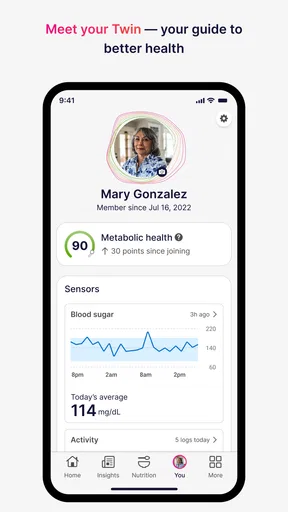
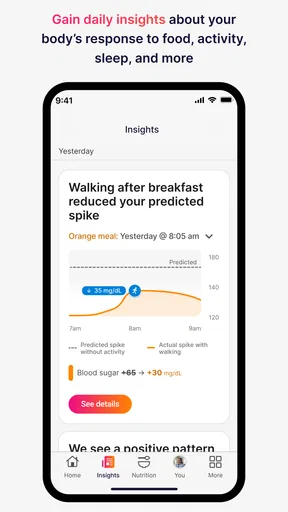
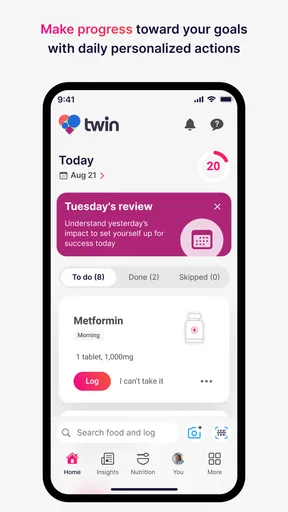
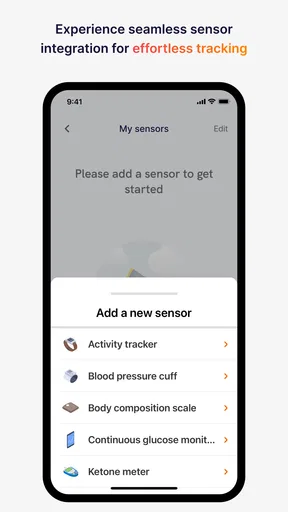
 Analysis by AppCompare
Twin Health is a medical app from Twin Health that focuses on supporting metabolic health through precision health technology. I approached it as a first-time user would: looking for a clear starting point, trying to understand what kind of daily commitment it expects, and deciding whether it feels useful beyond the initial download. My overall impression is that it is best viewed as a guided health companion rather than a quick reference tool or a replacement for professional medical care.
The app is free and suitable for Everyone, which makes the initial decision easy. It has reached over 100 thousand installs and holds a 4.6 average from around 2.4 thousand ratings, so there is a meaningful user base behind it. Still, those figures do not tell you whether it fits your routine. The more important question is whether you want to engage with a structured approach to metabolic health instead of relying only on occasional readings, general wellness articles, or a basic food diary.
What to expect when you begin
The first thing I would tell a new user is not to expect an instant diagnosis or a single dramatic result. Twin Health is built around ongoing support, so its value is likely to become clearer as you use it consistently and pay attention to patterns. That makes the first session more about orientation than achievement. You are establishing the context in which the app can help you think about your health, rather than simply opening a calculator or browsing a list of tips.
That distinction matters because many medical and fitness apps make a strong first impression with a dashboard full of numbers. A metabolic-health app can be more useful when it helps connect everyday decisions with longer-term goals, but that also requires patience. If you only want a one-minute tool for checking a value or recording a meal, this may feel more involved than necessary. If you want a continuing framework for understanding your habits, the approach is more promising.
I also recommend starting with a realistic expectation of privacy and attention. Health apps are not passive entertainment. Even when the interface is simple, the information you enter and the choices you make deserve careful thought. Before rushing through setup, I would read each prompt and avoid entering guesses simply to reach the home screen. A rushed beginning can make later guidance less relevant and can leave you unsure about what the app is actually using to support you.
The developer is Twin Health, and the app belongs firmly in the medical category rather than general lifestyle entertainment. That is a useful signal about how I would use it: as a support tool alongside appropriate clinical advice, not as an authority that should overrule a doctor, prescribed treatment, or urgent care. Anyone managing a diagnosed condition should treat the app as an additional aid and discuss important changes with a qualified professional.
The first setup should be treated as a health conversation
During setup, take a moment to think about what you want from the experience. A vague goal such as “be healthier” is easy to choose but difficult to act on. A more practical intention might be understanding how your daily routine affects metabolic health, becoming more consistent with habits, or having a place to review progress. You do not need to turn the first session into a complete life plan, but knowing your main reason for installing the app will make the next steps easier to judge.
Worth Reading Before You Choose

EA SPORTS FC Mobile 26 Is a Bigger Football Game, but It Takes Time

Flipboard Shows What News Apps Must Do Beyond the Feed

Switching to Android Auto Means Rethinking Your Driving Routine

Google Calendar Makes a Crowded Week Easier to Manage

Ludo King Makes the Most of the Minutes Between Plans

Baby Panda World Brings Quick Play to Modern Phones, but Its Game Library Feels Busy
I would also set aside a few quiet minutes rather than installing it while distracted. Medical onboarding tends to be less forgiving than a casual game tutorial. If the app asks for personal context, answer as accurately as you can and pause when a question is unclear. The best result from any personalized health tool depends on the quality and honesty of the information behind it.
One practical tip is to keep a short note outside the app about your starting point and your main concern. This does not need to contain private medical details; it can simply be a reminder of what you hoped to improve and what made you download the app. After using Twin Health for a while, that note gives you a better comparison than memory alone. People often remember their strongest days and forget the ordinary ones, which makes progress harder to judge fairly.
Another useful habit is to avoid changing everything at once. If the app encourages several adjustments, choose a manageable starting action and learn how it fits your day. This is especially important for users who have tried strict plans before. A sophisticated health platform cannot compensate for a routine that is too demanding to maintain. Consistency is usually more informative than a burst of enthusiasm followed by abandonment.
Finding the first meaningful success
For a first-time user, a meaningful success is not necessarily a perfect health score or a major physical change. It is completing a useful cycle: opening the app with a clear purpose, following the guidance available to you, and returning later to reflect on what happened. That may sound modest, but it is the point at which Twin Health becomes part of your routine instead of remaining another icon on your phone.
I would choose one ordinary day for this first test. Use the app around a normal schedule rather than waiting for an ideal day when every meal, walk, and bedtime goes perfectly. A normal weekday reveals whether the process fits real life. If you work irregular hours, care for children, travel, or eat at changing times, those circumstances are not side issues; they are exactly what determines whether a health routine is sustainable.
After completing the first useful action, take a moment to ask three simple questions. Was the instruction understandable? Could I complete it without rearranging my entire day? Did the result give me something I can use tomorrow? These questions help separate genuine usefulness from the excitement of trying a new app. They also show where friction is coming from: unclear guidance, an unrealistic routine, or a mismatch between the app and your goal.
A less obvious benefit of this approach is that it prevents overreaction. Metabolic health is influenced by many factors, and one day is not a verdict on your health or your discipline. If a recommendation feels difficult, that does not automatically mean you have failed. It may mean the action needs to be made smaller, scheduled differently, or discussed with a professional. I prefer this mindset to treating every result as a pass-or-fail test.
For someone who wants accountability, the most valuable workflow may be reviewing the app at a fixed point in the day rather than checking it constantly. A brief evening review can help you remember what was practical and what was not. Someone with a busy morning may do better with a midday check. The right moment is the one you can repeat; there is little benefit in choosing an ideal time that you regularly miss.
Where new users may become confused
The phrase “precision health” can create an exaggerated expectation that every suggestion will feel perfectly tailored or that the app will explain every health question in plain language. I would keep expectations grounded. Personalization is useful only when it leads to understandable, actionable guidance. If a recommendation feels too broad, do not assume that more effort or more entries will instantly solve the issue. First check whether you understand the goal behind the recommendation and whether it applies to your current circumstances.
Another common confusion is treating a health app as a complete medical service. Twin Health can support your efforts, but it should not be used to diagnose a new condition, interpret alarming symptoms on its own, or justify changing medication without clinical advice. If something feels urgent or medically serious, an app is the wrong place to wait for reassurance. This is not a criticism unique to Twin Health; it is an important boundary for any digital health product.
Users may also wonder whether they need to be highly disciplined before starting. In my view, no. Starting with an imperfect routine is more useful than waiting until your schedule is under control. The better question is whether you are willing to observe your habits honestly and make gradual adjustments. If you dislike tracking, reminders, or repeated reflection, the experience may become a chore. If you enjoy seeing how small decisions connect to a larger goal, the structure can be encouraging.
There is also a trade-off between guidance and independence. People who want a ready-made plan may appreciate having a focused health companion, while people who prefer to design every detail themselves may find the approach restrictive. A general wellness app can be better for broad exercise ideas, recipes, or open-ended habit tracking. A consultation with a dietitian or doctor is better when your situation requires clinical interpretation, individualized treatment, or careful management of several conditions.
One practical way to reduce confusion is to separate information from action. First understand what the app is asking you to notice. Then choose one response that fits your day. Trying to absorb every screen and act on every suggestion at once can turn a potentially helpful system into mental clutter. I found that the experience makes more sense when I treat each recommendation as a prompt for a small decision, not as a command to redesign my entire lifestyle.
How it compares with familiar alternatives
Compared with a basic calorie counter, Twin Health appears more focused on the broader idea of metabolic wellbeing than on reducing every meal to a number. That can be an advantage for users who become anxious or overly rigid when food tracking dominates the experience. On the other hand, someone specifically seeking detailed nutritional logging may prefer a dedicated food-tracking app with tools built around ingredients, portions, and meal history.
Compared with a fitness tracker, its appeal is different. A fitness tracker is often strongest at movement, workouts, sleep-related information, or quick activity feedback. Twin Health is more relevant to a person whose main concern is understanding metabolic health and building supportive routines. If your goal is training for a race or analyzing exercise performance, a sports-focused platform will probably serve you better. If your goal is connecting daily health choices with metabolic support, this app has a clearer reason to exist.
Compared with general medical reference apps, it is less about searching for a symptom and more about maintaining an ongoing relationship with your own health goals. That is useful when you want continuity, but it is not the right substitute for a trusted clinical source when you need an explanation of a diagnosis or treatment. I would use reference material for education, professional care for decisions, and Twin Health for structured personal support.
The free price lowers the barrier to trying it, but free does not mean effortless. Your time, attention, and willingness to follow through are the real investment. I would not install it simply because it costs nothing. I would install it if metabolic health is an active priority and I am prepared to give the app enough consistent use to judge whether its guidance fits me.
Who will benefit most, and who should look elsewhere
I can recommend Twin Health most readily to adults who want a focused way to support metabolic health and who are comfortable treating an app as part of a longer process. It may also suit people who have tried disconnected tools—a food log here, a step counter there, and occasional searches for health advice—and now want a more coherent starting point.
It is less suitable for someone looking for emergency medical guidance, a one-time diagnosis, or a purely manual tracking tool. It may also frustrate users who expect immediate visible results or who do not want to spend time answering health-related prompts and reflecting on routines. People with complex medical needs should be especially careful about interpreting guidance independently and should involve their healthcare team where appropriate.
For families, the Everyone age rating makes the app broadly accessible from a content perspective, but that does not turn it into a universal health solution for every age or medical situation. I would be cautious about applying its guidance to another person, particularly a child or someone with a condition that requires specialist care. Personal health advice should remain personal.
The current version is 4.200.0, and the app has been available since March 28, 2019. Those details suggest a product with an established history rather than a brand-new experiment, but they still do not remove the need to judge the current experience on your own phone and in your own routine. Compatibility begins with Android 9, so users on older devices should check that their phone meets the requirement before planning around the app.
My practical routine for getting value from it
If I were helping a friend start, I would suggest a simple first-week approach. Begin by identifying one health question you genuinely want to explore. Complete the setup carefully, then use the app during an ordinary day. Do not chase perfection or make several major changes simultaneously. At the end of the week, review which actions felt natural, which ones created friction, and whether the guidance helped you make a clearer decision.
Keep a short list of confusing terms or recommendations instead of ignoring them. That list can become useful when speaking with a clinician, because it turns a vague feeling of uncertainty into specific questions. This is one of the strongest ways to use a digital health app responsibly: let it organize your observations without allowing it to replace expert judgment.
I would also pay attention to emotional friction. If seeing health information makes you feel motivated, the app may reinforce a constructive routine. If it makes you feel guilty or compelled to check constantly, reduce the frequency of checking and reconsider whether a different format would suit you better. A tool that supports metabolic health should fit into a sustainable life, not become another source of pressure.
After the first meaningful success, the next step is not automatically to do more. It is to repeat what worked and remove whatever made the process unnecessarily difficult. That might mean choosing a more convenient time to engage, narrowing your focus, or bringing a question to a healthcare professional. Progress is more believable when it survives busy days, travel, imperfect meals, and changing motivation.
My final view is positive but measured. Twin Health is most convincing as a structured companion for people who want ongoing support with metabolic health, not as a magic shortcut. Its free access and broad Everyone rating make trying it straightforward, while the medical focus gives it a clearer purpose than a generic habit app. The main trade-off is commitment: you need to participate thoughtfully, interpret guidance sensibly, and accept that meaningful health improvement takes time.
I would recommend giving it a fair trial if you have a specific reason to work on metabolic health and want more direction than a blank notes app can provide. I would choose a different tool if I mainly wanted exercise statistics, detailed food databases, emergency answers, or complete control over manual tracking. Used within those boundaries, Twin Health can be a practical first step toward paying closer attention to daily choices and turning that attention into a routine you can actually maintain.
Pros
- Personalized guidance based on continuous health data.
- Tracks multiple wellness metrics in one app.
- Can help users identify patterns in daily habits.
- Supports proactive conversations with healthcare providers.
- Useful reminders can encourage healthier routines.
Cons
- Requires compatible wearable devices for the full experience.
- Some features may depend on a Twin Health program or provider.
- Continuous tracking can raise privacy concerns for some users.
- Data insights may take time before becoming meaningful.
- The app may feel overwhelming for users new to health tracking.
FAQs for Twin Health
What is Twin Health and how does it work?
Twin Health is a digital health platform designed to help users improve metabolic health through personalized guidance. It typically combines information from connected devices, health assessments, lifestyle data, and coaching to create recommendations related to nutrition, activity, sleep, and other daily habits. The exact features and level of personalization may vary depending on your location, plan, eligibility, and the healthcare services offered through the app.
Is Twin Health suitable for people with diabetes or other medical conditions?
Twin Health may be intended to support people managing metabolic conditions, including certain forms of diabetes, but suitability depends on your individual health situation and the program available in your region. It should be used as a complement to professional medical care, not as a replacement for a doctor, prescribed medication, or urgent treatment. Speak with a qualified healthcare professional before changing medication, diet, or exercise.
What devices or information does Twin Health require?
The information required can differ according to the Twin Health program you join. The app may request details such as age, medical history, medications, meals, activity, sleep, weight, and other health measurements. Some programs can also connect to wearable devices or glucose-monitoring tools. Before enrolling, review the supported devices, permissions, and data requirements to confirm that your phone and existing health equipment are compatible.
Does Twin Health provide medical advice or access to healthcare professionals?
Twin Health may include coaching, educational content, health recommendations, and, in some programs, communication with clinical or wellness professionals. However, the services provided are not necessarily the same for every user or country. Recommendations shown in the app should not be treated as emergency medical advice. If you experience severe symptoms or a medical emergency, contact local emergency services rather than relying on the application.
Is Twin Health free to download and use?
Downloading the Twin Health app may be free, but access to its complete program is not automatically free. Depending on your employer, insurance provider, healthcare organization, or location, you may need an invitation, eligibility confirmation, subscription, or separate enrollment. Check the official listing and enrollment information for current pricing and terms, including whether coaching, connected devices, consultations, or premium features involve additional costs.


